


Kccitystar
-
Posts
8161 -
Joined
-
Days Won
42
Content Type
Profiles
Forums
Downloads
Everything posted by Kccitystar
-
Final release won't have the 15. No worries.
-
I'll see what I can do. This is what I've got so far:
-
The fact that you are able to filter by team to pick your guys makes the ASG balloting this year a joke
-
Here's some ongoing notes on what's changing in Patch 2: Visual Changes: I held a minor role in this project in the beginning doing the frontend work for the game which included menu screens and gave kyleb the freedom to create the loading screens to wrap up my role. As kyleb is enjoying his summer (as he should), I decided to tackle more visual stuff and decided to attempt to implement some more design choices that I feel are in the spirit of the original game as it was released, as the showdown between pitcher/hitter was always big focus for the MVP series when it was being developed. I think the biggest change will be the overlay that will be included in this mod. For a long time, I've noticed that there have been more and more things added to the in-game overlay which were perceived as being integral to the gameplay, things like runner speeds, pitcher stamina, pitch count, things like that. Over time, I realized that this additional data would be insanely beneficial if the game was in 16:9 format (widescreen), as there would be a lot more screen space dedicated to show these things. However, unfortunately, that's not the case. After doing some testing on changing font sizes, maybe moving these things somewhere else on the screen, I came to the realization after taking some screenshots that a horizontal scorebug or a smaller sized one is the way to go, with no extra data included. I realized that If I have to pause the game to view these things, that's perfectly okay, as it was the intention of the developers by design to maintain as much visual space as possible on the screen due to the 4:3 resolution. You can say it's best to go back to basics, I guess. From a design standpoint, having as much information on display as possible gives me the least amount of effective screen space to concentrate on what's going on. For example, I will show a couple of screenshots to illustrate my point. This has been the defacto standard with overlays since...I want to say 2008? 2007? As you see, there's a lot going on. A lot of this data is possible to view if I paused the game so I don't think it's necessary to have it on the screen at any point in the AB. I was always a fan of the horizontal bar which was completely unobtrusive and would often provide a lot of effective screen space, but there is an overlay I found that hits the mark. An even smaller scorebug would be just as effective if not, perfect: This is the 07 overlay by Trues and I'm looking to tweak either this overlay or the 2006 MLB on FOX overlay for Patch 2. There's as much screen space as possible to concentrate on the at-bat, and all of the information you need relevant to the current AB is there as unobtrusive as possible within the confines of the game's 4:3 resolution, and any advanced information that you need to know can be accessed by pausing the game. I will stress that by all means, you can use your own overlay of choice, as maybe your user experience varies from my own, and that's okay. We've got a lot of overlays on our site for that reason I'll go into more of the performance stuff tomorrow, but that's all I'll disclose for now in terms of visuals
-
ESPN has an article explaining ways that MLB can fix the all-star game for the years ahead. I'm not a big fan of the current system having fans vote within the first month of the season for their picks, but their ideas sound good. http://espn.go.com/mlb/story/_/id/13131162/how-fix-major-league-baseball-all-star-game-vote What do you guys think?
-
Here is the most recent beta which includes some changes to the way balls are hit around the field, not just physics between the bat/ball. More balls hit in the gap, fielders are a little slower in chasing these hits down the field, grounders roll a little longer and and fly balls stay in the air a little more. Put this text file in your data folder and it will implement the changes. datafile.zip
-
maaaaaan I just wrapped up the Astros roster list!
-
Version 1.1
665 downloads
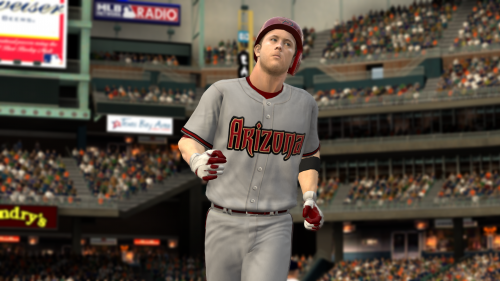
Included are the 2015 Home and Away set of all associated uniforms, as well as team logos for the Arizona D'Backs, and a colorlist that corresponds to team color changes for these uniforms. It is recommended that you back up all your changes as well as exporting your original colors for all of the D'Backs uniform slots using Ty's Roster Editor for MLB 2K12. INSTRUCTIONS: 1) In this mod series are 11 files that can be MANUALLY EXTRACTED TO YOUR MLB 2K12 FOLDER. They will overwrite the following: Your MLB 2K12 directory can be (if you have an x64 version of Windows) either in: ***VERY IMPORTANT*** 2) There is also a colorlist.txt file that you should IMPORT TO YOUR ROSTER using the MLB 2K12 Roster Editor (Roster Editor is included with this mod) HOW TO IMPORT THE COLORLIST.TXT FILE: 1) Load up your roster/franchise/career mode using Ty's Roster Editor for MLB 2K12 2) Go to Uniforms, click Import and select the text file. 3) It will notify you when the changes have imported successfully. Once all of these procedures are done, you can run MLB 2K12 and begin playing. Thank you, and enjoy! -
I've been watching a few highlights from older baseball games and I cannot think of another beastly arm that has taken the field in recent memory other than Vladimir Guerrero. That man had a shotgun attached to his right shoulder. Who do you guys think has got the best outfield arm in the game today?
-
 Unfortunately, no. This is only for the PC version of MVP Baseball 2005.
 -
These portraits are going to be ON POINT
-
I forgot to talk about the camera angles for the datafile! Zoom Here is the Zoom view. As you can see, it widens the camera view so the field seems much bigger and should help with the ball physics/trajectory/fielder speeds. This is a triple that was hit by George Springer. Broadcast Here is the Broadcast view, which is a beautiful camera that gives you a broad view of the field from say....a pressbox seat. I should rename it Press Box in the LOC file. This is Chris Carter lining out to the right fielder. Aerial Here is the view for the Aerial cam. Keep in mind that because of the FOV tweak, the camera will follow the hit vector (ball trail, even if it's disabled) which makes following the hits much easier in this view. This is going to be a double by George Springer. I'll keep tinkering with these
-
All, Here's the latest beta of this datafile and associated files. I will stress to keep the feedback in this thread only as this is the datafile that we are working on including for the second MVP Baseball 15 patch. I haven't uploaded this to the site yet because it's not a completed mod (Patch 2 isn't scheduled to be done until the end of July/Beginning of August). There are a lot of changes since the initial release of MVP Baseball 15: There's a LOT of work here and although the changes sound small, they do in fact make a huge difference. What I'm having isssues with so far is the trajectory/ball physics. Too many guys over the course of 25 full games that I've played are hitting bombs over 360 feet although they do not have the actual power to drive the balls that far. As I don't play with sliders (I'm a purist that plays as the game was designed, sorry), I'm thinking I may have to tweak the ball speed a little as it may seem that making solid contact = maximum MPH off the bat. We're a month and a half away from Patch 2, and I'm excited to share the second patch with you all as this entire project (MVP Baseball 15) is intended to be a love letter to MVP Baseball 2005, the game that brought us all here in the first place. Cheers, -KC EDIT: The datafile has been updated. Scroll below.
-
I am looking to gather as many faces as possible not featured in the 2015 mod for Patch 2 (Parche Dos, para los hispanos) before July 31st. You guys are really talented
-
Patch 2 Survey: FOV adjustments for 16:9 monitors?
Kccitystar replied to Kccitystar's topic in Support
My rationale for changing up the FOV is simple. The game is designed in 4:3 format. Originally had FOV values like 43, 60, etc. that made the field view and cameras narrow to fit that format. An FOV value of 75 or even 90 would make the field appear wider as its' supposed to look to emphasize the size of the field and exactly how much actual ground the fielders have to cover. It also helps with all of the changes I've done to the datafile in regards to ball trajectory. To someone playing the game in a stretch-to-fit mode, as most people who play 4:3 games do, this will at least make the field look normal, somewhat. -
Patch 2 Survey: FOV adjustments for 16:9 monitors?
Kccitystar replied to Kccitystar's topic in Support
I decided to just keep it at 90 across all resolutions, it looks very nice and gives the stadiums/field that big space that makes the game feel much more realistic. It's a slight camera trick, sure, but it works -
Patch 2 Survey: FOV adjustments for 16:9 monitors?
Kccitystar replied to Kccitystar's topic in Support
http://www.mvpmods.com/files/file/3004-mlb-on-fox-06-overlay/ -
Patch 2 Survey: FOV adjustments for 16:9 monitors?
Kccitystar replied to Kccitystar's topic in Support
Here's what I have in mind, this is stretched to 1920x1080 resolution through an .exe hack I did: -
Patch 2 Survey: FOV adjustments for 16:9 monitors?
Kccitystar replied to Kccitystar's topic in Support
I've been bumping up the FOV from the 4:3 average of 45 to 90 and it looks stunning. I'll work on the fielding cameras as well. The hitting cams as well as cameras the game uses to pan around the field look amazing since the field gets scaled and looks HUGE. -
Everyone, I just wanted some community input on how you guys play MVP Baseball 2005. As I'm including a datafile update with Patch 2, I'm looking for some input on how you guys play the game from a visual standpoint. Do you guys play it as purists with the original 4:3 resolution (so the game plays within a box on your monitor), or do you have the game stretched out on your display in widescreen? The reason I ask is so that I can alter the FOV (field of view) to accomodate widescreen format for you all so you can view ALL of the field and not just whatever was limited to 4:3 resolution. It's not going to make the *entire* game widescreen but it will give the perception that the game is in natural widescreen format. Take a vote, and thanks!
-
There's nothing wrong with the game, it does this so you can focus on what you are doing.
-
It could be an issue with your graphics settings if you globally max them out for different games
-
Total Control batting is used to hit with the analog stick. Switch over to Classic (press the left analog stick..or L3 to get to this menu under controller config) and it will dedicate your swing to a button press and a checkswing to a double-tap
-
Headshot
-
Attached are the stadium files for netwday and netwnite. You don't need to install these with TiT, just take netwday and netwnite.big and put them in your "Stadium" folder. I anticipate a screenshot with the beautiful green grass Cheers! netw-fix.rar